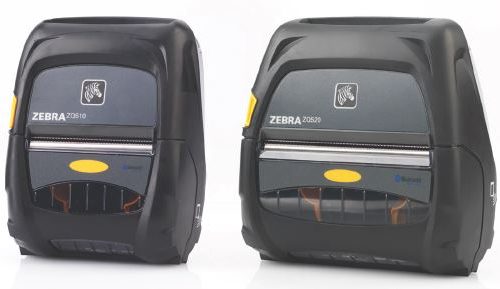
When your team can’t afford to walk back to the print room: rugged, portable label and receipt printers for warehouse, field and delivery operations.
Every time a warehouse worker walks back to a fixed printer to generate a pick label, that’s time not spent picking. Multiply that across a shift, across a team, and the cumulative drag on throughput becomes significant. For delivery drivers, the problem looks different: pre-printed proof-of-delivery receipts that don’t match what was actually delivered, or paperwork that has to be produced back at the depot rather than on site.
Mobile printers change both of those workflows. Workers generate labels and receipts at the point of need, without leaving the job. Fewer unnecessary steps, fewer errors at the point of production, faster turnaround at each stage of the operation.
What Mobile Printing Does for Your Operation
A mobile printer is a battery-powered thermal unit that clips to a belt or sits in a carry bag. It connects to handheld computers, tablets or smartphones via Bluetooth or WiFi, and prints labels or receipts wherever the worker happens to be.
In a warehouse, that means picking, receiving and put-away teams can produce labels on the spot. No round trip to the print station. For operations running high-volume, multi-shift workflows, that friction point adds up across every shift, every day. Some operations see measurable throughput gains once workers can print on the move.
For delivery and field service teams, mobile receipt printers remove the pre-print process entirely. Drivers produce proof-of-delivery receipts, invoices or compliance labels on site. Fewer pre-printed stock errors, less wasted paper, and documentation that reflects what was actually delivered.
In retail, floor staff can reprint shelf labels, produce price tickets or process returns without leaving the floor. Price changes and product moves get handled faster, with less disruption to the customer experience.
One honest qualification: mobile printing works best when the workflow genuinely involves workers moving around. If someone is printing 200 labels at once from a fixed workstation, a desktop printer is the right tool. A good advisor would tell you that, and Gamma’s team will.
Three Categories, Three Different Jobs
The right mobile printer depends on what you’re printing, where you’re working and how demanding the environment is. Here is how Gamma’s range breaks down.
Mobile Receipt Printers
For teams that need clean, fast receipt output on the go. Suited to hospitality, retail and light field service where a small-format receipt print is sufficient. These are compact, lightweight units designed for convenience rather than industrial durability.
Rugged Mobile Label Printers
IP-sealed, drop-rated label printers built for full-shift use in warehouses, logistics sites and field operations. These handle barcode labels, shipping labels and compliance formats across the Zebra ZQ and Honeywell RP series. If the environment is rough, the shift is long or the label volume is high, this is the category to start with.
Rugged Mobile Receipt Printers
Hardened receipt printers for delivery drivers, transport operators and field teams who need reliable print output in demanding environments. Built to take the knocks that come with vehicle-based or outdoor fieldwork, not designed for an office.
The distinction matters. Someone equipping a 3PL warehouse operation with rugged label printers shouldn’t have to sort through receipt printers to find what they need.
Gamma’s Role: Advisor, Not Just Supplier
Choosing a mobile printer isn’t only about the hardware spec. It’s about whether the unit pairs with your existing handheld computers, whether it runs on your warehouse management system, what label formats you’re printing and how many per shift. Gamma’s team works through those questions with customers before recommending a model.
If your business is moving from fixed desktop printers to mobile printing, there’s usually more involved than swapping hardware. Label templates may need reformatting. The print software stack may change, particularly if you’re running NiceLabel, BarTender or ZPL-based applications. The handheld computer needs to be compatible. Gamma can map that full picture, not just point you to a product listing.
For businesses that need to trial a model before committing to a fleet purchase, or that face seasonal peaks where print volume spikes, Gamma offers rental options. That’s a practical alternative that most hardware retailers don’t provide.
When a unit underperforms in the field, Gamma’s service and repair capability means you’re not waiting on a manufacturer’s support queue. Gamma has been working with warehouse and field operations since 1993. The team knows what breaks in the field and how to resolve it.
Talk to Our Team
Not sure which mobile printer fits your operation? Gamma’s team can help you find the right fit for your workflow and hardware stack.
Call 1300 042 662 or use the form below to start the conversation.
Frequently Asked Questions
What is a mobile label printer and when does it make sense over a desktop unit?
A mobile label printer is a battery-powered thermal printer designed to be carried or worn by a worker and used at the point of need. It makes sense when the workflow involves workers moving around: picking in a warehouse, receiving stock at a dock, or labelling items in the field. If your team is printing large label runs from a fixed workstation, a desktop printer will be faster and more cost-effective. The right choice depends on the workflow, not just the hardware preference.
What is the difference between a mobile label printer and a mobile receipt printer?
Mobile label printers produce barcode labels, shipping labels and compliance labels, typically on a roll of label stock. They handle a wider range of media types and are the standard choice for warehouse and logistics operations. Mobile receipt printers produce smaller-format paper receipts, suited to proof-of-delivery, point-of-sale or invoice output. The print mechanism is similar but the media format, label width and intended use case differ. Choosing the wrong category creates compatibility issues, so it’s worth clarifying the output format before selecting a model.
How do mobile printers connect to handheld computers and warehouse management systems?
Most mobile printers connect via Bluetooth or WiFi. Bluetooth is common for one-to-one pairing with a handheld computer or smartphone. WiFi connections allow the printer to integrate directly with network infrastructure and, in some configurations, communicate with a warehouse management system. Compatibility between the printer, the handheld device and the WMS needs to be confirmed before purchase. Gamma’s team can work through those integration requirements with you.
Which mobile printer is best suited to warehouse picking and receiving operations?
For warehouse picking and receiving, a rugged mobile label printer is generally the right category. Units from the Zebra ZQ series and Honeywell RP series are purpose-built for this environment: drop-rated, IP-sealed and designed to run across a full shift without battery interruption. The specific model depends on label width, print volume per shift and which handheld computers are already in use. Gamma can help match the printer to your existing hardware and software stack.
Are Gamma’s mobile printers compatible with NiceLabel, BarTender and ZPL-based label software?
Yes. The Zebra and Honeywell units Gamma supplies support ZPL (Zebra Programming Language) and are compatible with NiceLabel and BarTender label design and print management software. If you’re migrating from a different print environment or need to reformat existing label templates, Gamma can assist with that process. It’s an area that often gets overlooked when businesses switch from desktop to mobile printing.
How long does the battery last on a Zebra or Honeywell mobile printer?
Battery life varies by model and print volume, but most enterprise-grade mobile printers from Zebra and Honeywell are designed to support a full shift of eight hours or more under normal operating conditions. High print volumes, cold environments or continuous connectivity can reduce that. Most units support hot-swappable batteries, so a spare battery can be swapped without powering the unit down, which matters in operations that can’t afford interruption between shifts. Gamma can advise on battery options for specific models.
Can Gamma Solutions help us trial a mobile printer before we commit to a fleet purchase?
Yes. Gamma offers rental options for businesses that want to trial a unit in their own environment before committing to a full fleet purchase. This is a practical option for operations that are new to mobile printing, or where a proof-of-concept is needed before a capital investment is approved. Contact Gamma’s team to discuss rental availability and terms.
Do you offer mobile printer rental for seasonal peaks or short-term projects?
Yes. Gamma’s rental service is available for seasonal demand peaks, short-term projects and temporary capacity increases. Rather than purchasing additional units that sit idle outside peak periods, rental gives operations the flexibility to scale print capacity up and down as needed. Gamma’s mobile printer rental page has more detail, or call 1300 042 662 to discuss your requirements.
Call 1300 042 662 to speak with a warehouse technology specialist.