
Slow Wi-Fi on Mobile Computers: Why It Happens and How to Test It
TL;DR
- On a warehouse floor, a “slow” scan is often a latency problem rather than a bandwidth problem.
- An internet speed test on a phone measures the wrong path: scanners communicate with the WMS, not with a speed test server.
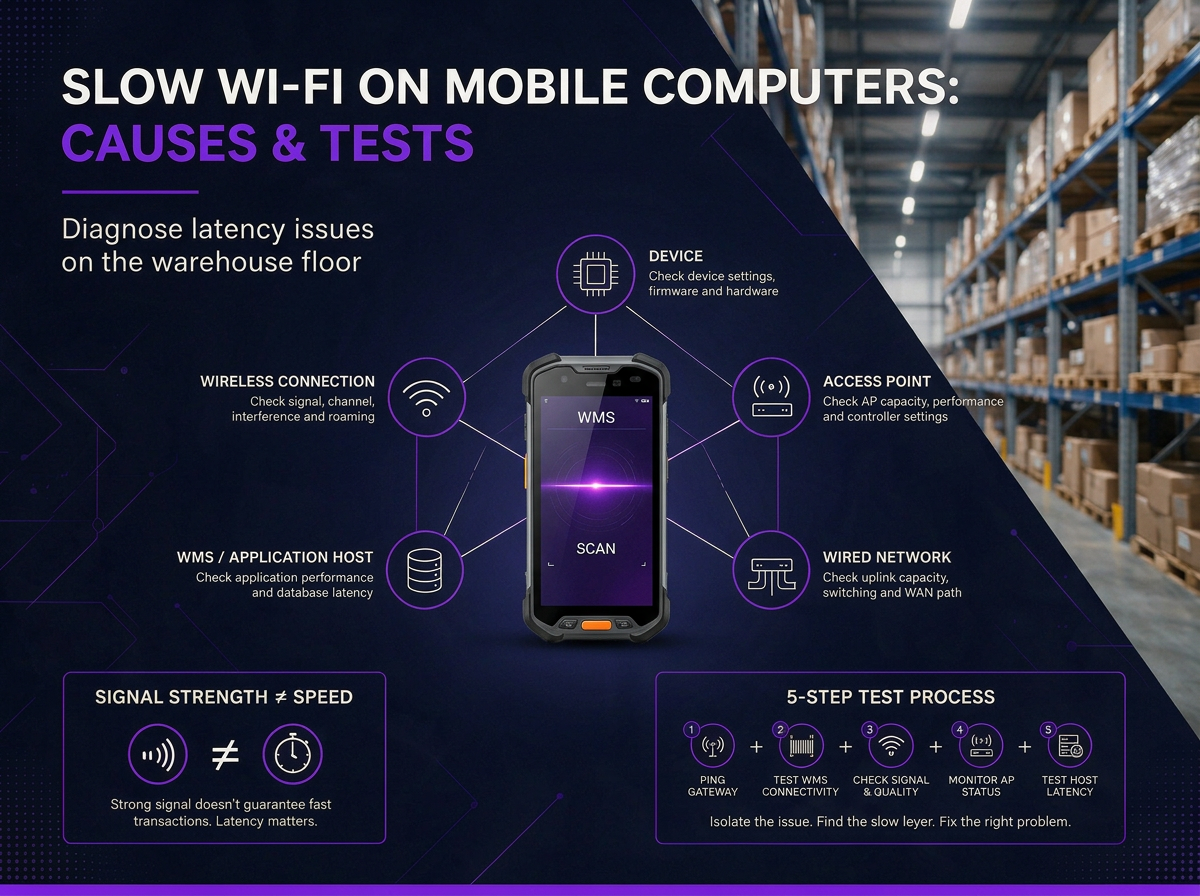
- The delay can sit in one of five places: the device, the wireless connection, the access point, the wired network or the application host.
- A slow device on a shared channel slows everyone on it, because it takes longer to send the same data and the others wait their turn.
- Pinging the gateway, then the WMS host, tells you which half of the path is slow.
A barcode scan and the WMS reply are tiny amounts of data, far less than a video call moves every second. So a network that streams video without trouble can still leave a picker staring at a frozen screen for two seconds after a scan. For a mobile computer, “slow Wi-Fi” is often less about how much data the network can move and more about how long the transaction takes, and where that time is being spent.
You can start tracing the problem with one handheld and a laptop. The delay may not be where you first expect it. This guide explains what “slow” means for a scanner, the five places the delay can sit, the common causes at each layer, and a practical test you can run on your own warehouse floor.
What “slow” means on a mobile computer
A warehouse scanner doesn’t need to move much data. A barcode scan and the WMS response are small transactions, so throughput isn’t usually the limiting factor. What matters more is latency, or how long it takes for the request to travel through the network and for the response to come back.
Gamma designs warehouse networks for scan-to-screen times in the low hundreds of milliseconds. When a transaction starts taking seconds, the picker notices the delay immediately and may re-scan or assume the device isn’t responding.
That’s why an internet speed test on a phone doesn’t tell you whether the scanner is slow. The phone is testing its connection to an internet server, while the scanner is communicating with a WMS that may sit in the comms room or a data centre on a completely different path. A phone can show 200 Mbps next to a scanner taking two seconds to complete a transaction, and both results can be correct.
The same applies to the headline speed of the Wi-Fi standard. Wi-Fi 6 can provide much higher throughput than older standards, but a warehouse scanner typically uses only a small amount of data. Upgrading the Wi-Fi standard won’t automatically fix a delay caused by interference, roaming, the wired network or the WMS itself.
Where the delay lives
Every scan makes a round trip. It leaves the handheld, crosses the air to an access point, travels across the wired network to the WMS host, and comes back. A delay at any point can appear on the screen as the same symptom: a slow scan.
The useful question is who else is slow? Start there, then test each part of the path.
|
Where the delay sits |
What it looks like on the floor |
Quick test that points to it |
Usual fix |
|
The device |
One model is slow while another works normally in the same spot |
Repeat the same transaction with a different device model |
Check device settings and firmware, or replace ageing hardware |
|
The wireless connection |
Scanners are slow in particular areas or at busy times |
Compare gateway latency and signal quality in the problem area |
Review channel use, data rates, coverage and AP placement |
|
The access point or controller |
Multiple devices connected to the same AP are affected |
Check the number of connected devices and AP performance |
Add capacity, balance clients or review controller settings |
|
The wired network or WAN |
Wireless and wired devices are slow when network traffic peaks |
Compare gateway latency with latency to the WMS host |
Check uplink capacity, switching and the WAN path |
|
The application or WMS host |
Multiple devices and wired PCs are slow, or network tests are normal but transactions lag |
Test the WMS host separately from the wireless network |
Investigate the host, application or database |
The fastest way to narrow it down is to ask who else is slow. If wired PCs in the office are slow too, look beyond the Wi-Fi. If only handhelds in the cold store are affected, start with the wireless connection and access point serving that area. If only one older device model lags while others work normally, start with the device.
Causes on the device
Start with the handheld itself. An older radio or Wi-Fi generation can limit what a device can do, even after the access points have been upgraded. If one model is consistently slower than another in the same location, compare the two devices before changing the network.
Power-saving settings are another possibility. Handhelds can reduce radio activity to preserve battery life, but the way each device manages this varies by model and configuration. If delays follow a particular device model, check its wireless and power-management settings before blaming the access points.
Background traffic can also make a device appear slow. At the start of a shift, dozens of handhelds may come off their chargers and receive application updates, operating system patches or device-management tasks. Those transfers compete for wireless capacity with normal WMS traffic, so the slowdown may be most noticeable during the first part of the shift.
Mixed fleets can make the pattern harder to spot. A site running newer Zebra devices alongside older hardware, for example, may have one group responding normally while another lags in the same aisle. Different radios, drivers and device configurations can behave differently on the same network.
If the problem follows the device rather than the location, start with the device. If it follows the device as it moves between access points, investigate roaming separately.
Causes on the network
Once the device itself has been ruled out, look at how the wireless network is using the air.
Wi-Fi is shared. Devices using the same channel compete for airtime, so the longer one device takes to transmit, the less time is available to everyone else. A device operating at a low data rate can take longer to send the same amount of data, particularly at the edge of coverage or when interference forces it to retry transmissions.
The band affects how much room you have to work with. 2.4 GHz has fewer channels and is more prone to congestion, while 5 GHz provides more usable channels for dense enterprise deployments. Where handhelds support it and the site is designed for it, 5 GHz generally gives a warehouse more room to separate neighbouring access points.
Channel width is another trade-off. Wider channels can provide higher peak throughput, but they use more spectrum and leave fewer channels available for neighbouring APs. Gamma uses 20 MHz channels as its standard, giving the network more options for separating nearby access points.
If handhelds show a strong signal and still perform poorly, interference may be the problem. Signal strength alone doesn’t show whether another network or source of RF noise is competing for the same channel. See Gamma’s guide to RF interference in warehouse Wi-Fi for how to identify and troubleshoot it.
If the wireless environment looks healthy, move on to the access point, wired network and WMS host rather than changing the RF settings again.
A simple test on the warehouse floor
You don’t need a lab to start narrowing down a slow scanner.
Take one handheld to the problem area and repeat the same scan with another device model. Then compare the result with a wired PC or another scanner in a nearby area. Do the same test during a busy period and when the warehouse is quiet.
The pattern usually tells you where to look. If one device is slow while another works normally in the same spot, start with the device. If several handhelds are affected in one area, look at the wireless connection and access point. If wired devices are slow too, move further into the network or WMS.
The goal isn’t to prove that the Wi-Fi is slow. It’s to find which part of the transaction is slow before you replace anything.
Find the slow layer first
Don’t replace access points or handhelds until you know what is causing the delay. If the problem points to the wireless network, a site survey can identify what needs to change and whether the issue is coverage, capacity or interference.
Frequently asked questions
Why is my Wi-Fi slow on some handhelds but not others?
Different handheld models can use different radios, drivers and power-management settings. If one model is consistently slower than another in the same location, the device is worth checking first.
Why is my Wi-Fi slow when the signal looks fine?
Signal strength only shows how well the handheld can hear the access point. It doesn’t show airtime contention, interference, retries or delays elsewhere in the network.
Wi-Fi signal strength vs reliability →
What is a good response time for a handheld scanner?
Gamma designs for scan-to-screen times in the low hundreds of milliseconds. Longer delays become noticeable to the person waiting for the WMS response.
Can one old device affect other devices on the Wi-Fi?
Yes. A device using a low data rate can take more airtime to transmit the same amount of data, leaving less airtime for other devices sharing the channel.
Should my handhelds use 2.4 GHz or 5 GHz?
Where supported by the handhelds and wireless design, 5 GHz generally provides more channel options and is less congested than 2.4 GHz. The right band still depends on the warehouse environment and network design.
Will new access points fix slow scanners?
Not necessarily. New access points only address certain wireless or capacity problems. If the delay comes from the handheld, wired network or WMS, replacing access points won’t address the cause.


